Stop Managing Folders: Git Worktree Lanes for Agent-Era Development
Why hand-managed folders stop working once agents write most of the code - and the worktree-lane workflow that replaces them

The era of hand-managing directory folders is about over, and I want to walk through why — because if you’re scaling up how much you do in parallel with coding agents, you’ve probably already started running into this.
Why the old way stops working
If you try to manage folders manually while agents code alongside you, you’ll start noticing spillover: an agent makes a change in a folder that functionally belongs with a different group of code. You clean it up, it happens again. The folder structure was never the real boundary — it just looked like one when a single human was the only writer.
You also already have the instinct to multitask. Nobody wants to sit and watch an agent finish. But if you multitask the old way — several changes cooking in the same working copy — you hit a hard human limit of holding maybe one or two directories in your head at once, and past that you’re just hoping.
So the only approach people have actually made work is this: figure out what the feature is, and ask the agent to spawn an isolated git worktree and a pull request for it. Then stop caring about the underlying file system, because it’s impossible to manage and you no longer need to. Your worktrees folder might have fifty entries in it. That’s fine. Git manages the worktree structure centrally — that’s the whole point.
A worktree is not “a branch in another folder”
This distinction matters, so let me be precise about it.
When you check out a branch, you’re swapping the code in your folder for a different set of code. You can clone the repo into two folders and put a different branch in each, but those two folders exist independently — Git doesn’t know they’re related, and nothing coordinates them.
A worktree is different. All worktrees hang off one shared Git database, so every lane always has a known parent and a known relationship to every other lane:
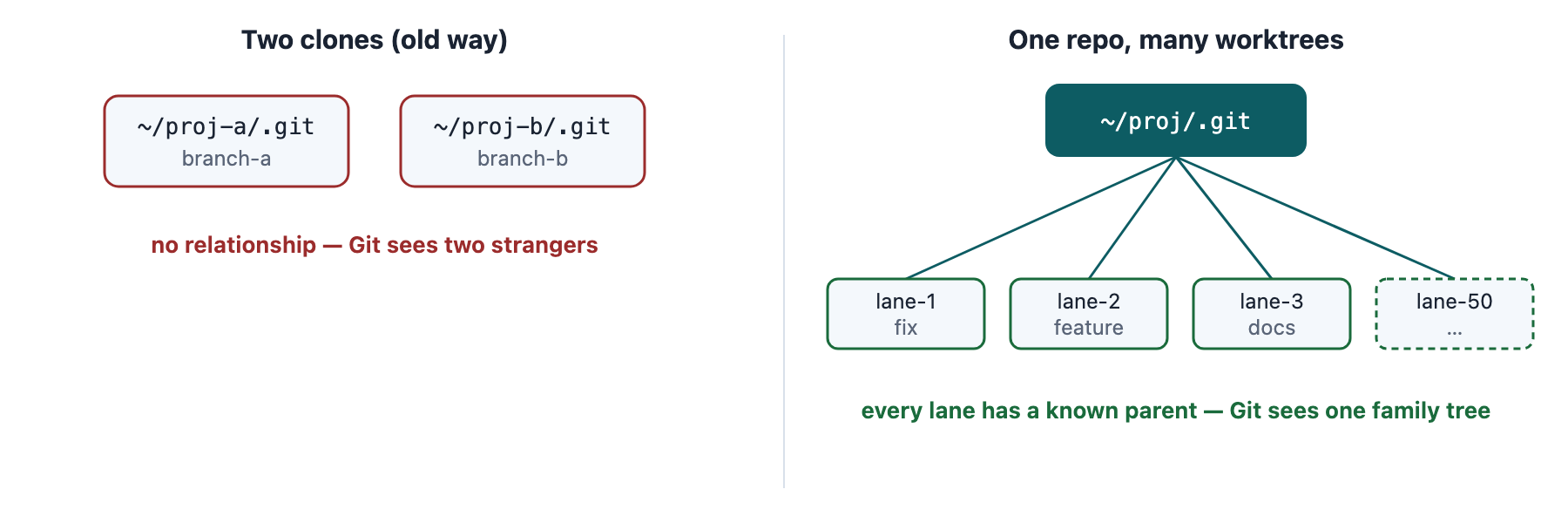
Two clones are strangers; worktrees are one family. The relationship is what reviews, rebases, and merge trains are built on.
When you spawn worktrees, you’re spawning code lanes that always have a parent. That relationship is what everything downstream — reviews, rebases, merge trains — is built on.
A worked example
Recently I put up a pull request for a complicated feature, and the code review came back with five remediations. I also had six PRs open at once, each with its own set of fixes. I’m not going to wait for each one to finish in order.
Now, you could prompt an orchestrator: “manage and spawn sub-agents to solve the five pull request issues” — all in one working copy. You might get lucky. What actually happens is the sub-agents start conflicting with each other, and the reason the run takes so long is that the orchestrating agent is quietly firefighting behind the scenes, un-breaking what its own workers did to each other.
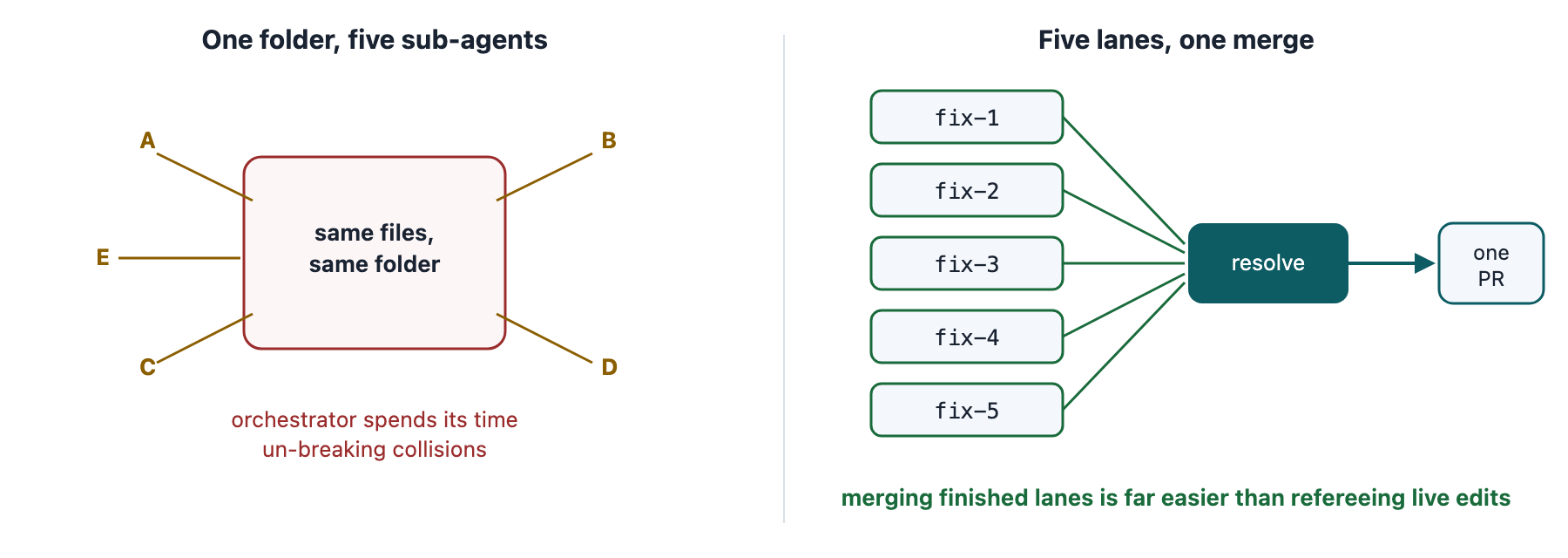
Same five fixes, two topologies. Isolated lanes turn a coordination problem into a merge problem, and Git is very good at merges.
You’re better off letting go of the compulsion to manage folders and instead spawning an isolated worktree per fix — separate lanes. Then the orchestrating agent resolves the lanes into a single change, which is dramatically easier for it than refereeing five sets of edits landing in the same folder.
Why this works: the diff is how agents understand anything
The fundamental nature of Git is that a change only means something as a difference from a base branch. That diff is how the agents understand what’s going on.
If you do several conceptually different things inside the same branch, the differences stop making sense — to Git, to a reviewing agent, and honestly to you.
The invariant: one lane, one concept, one clean diff. Everything else in this workflow depends on it.
The workflow, day to day
In the modern era, you sit at a terminal and say something like:
“Here’s my idea for feature one — this is the product spec. Spawn an isolated worktree and pull request, use whatever sub-agents you need to get it done.”
Dispatch it. Then start feature two the same way. You are no longer the bottleneck between features.
And because Git itself is tracking the worktrees, you get some genuinely useful moves for free as lanes finish:
Rebase choices. When a lane lands, you can rebase in-flight work onto it, or onto main — your call, and Git knows enough about the relationships to make it clean.
Clean review. Every lane reviews against its contrast branch. The reviewer sees exactly one feature’s diff, nothing else.
Letting go: the practical habits
A few things that make this workflow actually comfortable once you commit to it:
You can build off a pull request. This is the other magical part. A PR is a real, addressable base — so you can spin up a worktree on top of it and do your testing totally isolated from everything else. Test lane, feature lane, and main never touch each other until you decide they should.
Let go of knowing what your folders are. You literally have to. If you’re even slightly worried about overlap between two pieces of work, don’t deliberate — just tell the agent to make an isolated folder. Folders are cheap. Space is cheap. The deliberation is the expensive part.
Symlink your secrets. The one thing you don’t replicate across fifty worktrees is credentials. Ask the agent to symbolically link your secrets file (.env.local and friends) into each worktree — every lane sees them, no copies exist, and nothing secret ever lands in a diff.

Secrets live once, outside the repo, and link into every lane.
Tidy up with confidence. When a lane is done and merged, delete the folder — actually delete it, without the usual archaeology first. Everything that mattered is in Git: isolated, archived, and recoverable. The folder was always just a workspace, never the record.
The context payoff (this is the magical part)
Remember that agents are limited by context. If you work out of one huge chat thread and you’re dying trying to hold it all together, you can hack around it — “write me a handoff file” — and read that back later. It works, barely.
But work the way I’m laying out and something better happens. You end up with a clean pull request, for one specific feature, in an isolated worktree — tracked by GitHub as a PR and by Git as a worktree. All the context a reviewer needs is inside that request.
So you can open a completely fresh session with whatever high-powered agent you want and just ask for a review. It doesn’t need to know anything about the chat thread that produced the work.
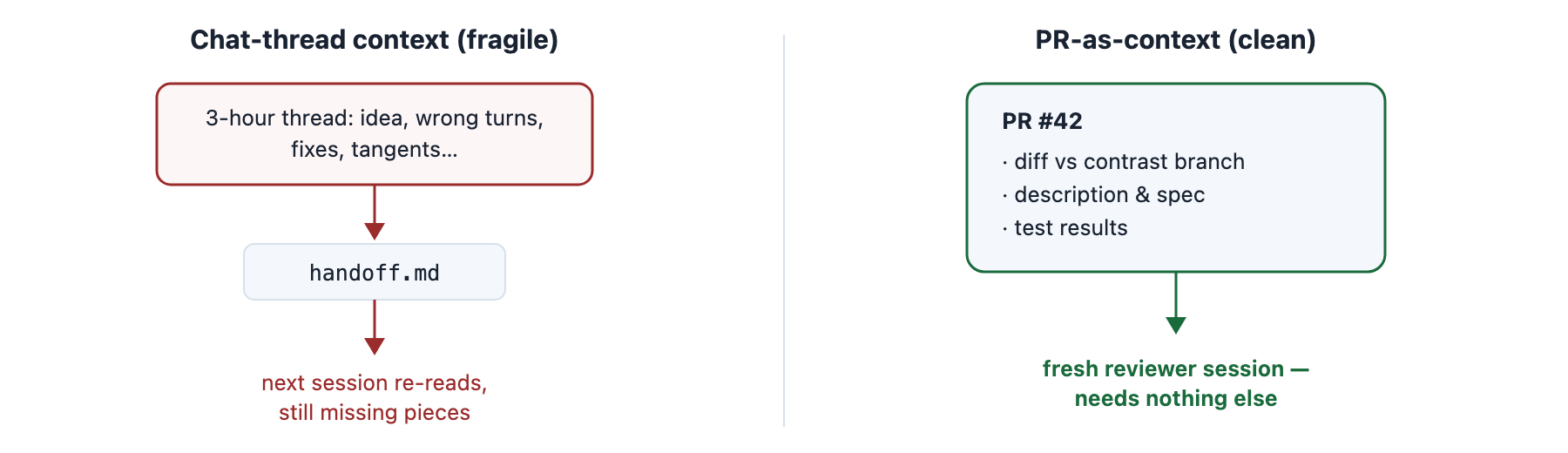
A PR carries its own context. Review becomes a fresh session, not a continuation of the writing thread.
This makes the review process isolated from the code-writing process — which is the way it’s always been done in good software development. We just get it back, at agent speed.
Then batch your reviews, and make sure you tell the agent to formally submit the review to the GitHub pull request — not just chat about it. Formal reviews flip real flags on the PR (approved, changes requested, pending), and that state is what everything downstream reads.
What this unlocks
At this point everything is logged on GitHub, and underneath that, in plain Git. Which means you can now ask questions that used to be unanswerable:
“I’m ready to merge. Look over the open pull requests, figure out which ones haven’t been reviewed yet, and propose a merge train.”
“I’m about to start feature X. Look through the current PRs and figure out the most strategic place to base the worktree off of, to minimize merge pain later.”
The agent can answer both — not because it’s clever, but because the state actually exists somewhere it can read: PR flags, lane parents, diffs against contrast branches. That’s what we bought by giving up hand-managed folders.
The one-sentence version: stop managing folders, start dispatching lanes — one worktree, one PR, one concept — and let Git hold the structure.